The Legal Case for Cloud-Based Faxing | eFax Corporate

Cloud Strategies for the Legal Industry

Imagine the following scenario; a young lawyer needs to send the court some important documents that are critical to her case. However, there’s a problem; the court clerk only accepts documents by fax and the lawyer, due to a paper jam, doesn’t get the fax sent in time. Her inability to satisfy the administrative rules have potentially put her case in jeopardy.

Later that day, the lawyer is asked to proofread a contract. A partner in the firm has already printed the contract and jotted hand-written notes throughout. After adding some edits of her own, she faxes the contract to the opposing party for review. This group responds with their comments and suggestions via fax. The lawyer then drafts the final version of this comprehensive document and sends it to a team of legal researchers.
Due to the highly confidential nature of these types of documents they are sent via fax, which ensures that they cannot be hacked or accessed by unauthorised personnel.

The legal industry is powered by paper. Legal cases may be supported by thousands of paper documents – copies of original contracts, records and correspondence that need to be shown as proof in court. And it’s likely that multiple copies of these will be required.

When it comes to sending sensitive information, faxing is the communication tool of choice for professionals in the legal industry. As one of the world’s most heavily-regulated professions, one security mistake could destroy a case for a team that may have been working on it for years. This type of blunder could result in damaged reputation, audits or severe fines.

In the law industry, where 80% of the administrative process is paper-based due to the level of regulation, it is imperative that private information is protected. Generally, more established lawyers prefer editing documents by hand. Following the editing process, the documents are almost always sent via fax to the intended recipients.

However, given the rate of advancement in modern ICT, those responsible for their firm’s IT are increasingly asking themselves: “Is my ICT infrastructure allowing the firm to reach the levels of professionalism and efficiency it’s striving for?” If the answer is, “No”, it’s time to explore the solutions. 

Faxing and the Working Day

As they grapple with high caseloads, it’s necessary for solicitors to make the most out of the working day as well as maximising billable hours. For this reason, it’s important to be able to exchange information quickly and navigate complex research data and information with ease. Traditional faxing can slow down this process significantly and add unnecessary delays to an already busy day.

Legacy fax machines are both highly inefficient and can be costly. Yet, a poll by Spiceworks revealed that 62% of offices still have a traditional fax machine in operation, while only 10% of workers will actually use it. Consider the inefficiency of that. 62% of offices are still carrying out this painstaking process:

Sending documents via traditional fax machine:

  • Print a paper copy of the document
  • Make hand-written changes to the printed version
  • Wait to use the fax machine
  • Feed documents into the machine
  • Wait for the transmission to be processed
  • If delays such as a busy signal, low ink, or a paper jam occur, troubleshoot the issue
  • Wait for a delivery confirmation
  • File the details for record-keeping purposes

Completing the above steps for a single document can take between 15 – 20 minutes or even longer – a simple task that could be completed with a few quick clicks when faxing online. And whether it’s the company director, legal secretary, or intern, any time spent waiting by the fax machine is time wasted. 

Looking at the wider problems associated with traditional faxing, security breaches are a major concern. When documents are sitting on community fax machines — even for a short time,  highly sensitive information can go missing.

Even more concerning, is the risk of confidential data being exposed. With traditional faxing, a client’s bank details, medical history or other private details could fall into the wrong hands.

Time sensitivity is part and parcel when working in the judiciary system. The courts impose strict deadlines, however a motion by the opposing legal team or some newly discovered evidence can require a complete turnaround on a legal strategy.

This is why a timely communication process is mission critical. If fresh evidence needs to be submitted to the court urgently, traditional faxing can result in damaging setbacks and delays.

Many law firms have invested in fax servers in the hope of combatting this issue. The reality is, however, that this is highly unlikely to be a cost-efficient, long-term option. The costs of maintaining a fax server can run high when additional expenses such as upgrades, service packs and reconfigurations are factored in. 

When the time comes to replace a multi-channel T1 fax modem board, it can end up costing a business upwards of five figures. And after that investment, ongoing upgrades will be necessary.

Today many legal practices are seeking a better way to fax. Rather than continuing to waste money on maintaining outdated office equipment, they are actively seeking a more efficient form of fax technology.

How Cloud Faxing Can Benefit Your Law Firm

Online faxing, or cloud faxing, has become increasingly popular with businesses that still need to be able to send a fax, yet want the convenience and cost-effectiveness that comes with sending an email. It’s easy to see why cloud faxing has become increasingly popular with legal practices across the UK. But what benefits does it offer? 

Reduced Costs

Paperless, online faxing provides the equivalent scale of a fax server but without the expense. With cloud faxing, there’s no need to buy dedicated hardware, software or pay for additional IT services. Plus, there are no recurring monthly costs for a telephone line rental.

Online faxing also provides greater control of a company’s faxing costs, as pricing is tied to usage. An online fax provider will be able to offer various plans to choose from.

As everything in the price plan is outlined, there should be no surprises at the end of the month when it comes to additional costs. This will make planning and tracking office expenses and finances a lot easier.

Tighter Security

Another key benefit of moving faxing infrastructure online is security. Legal clients need guaranteed discretion and when using internet faxing and the cloud, security risks are significantly reduced. With cloud faxing, the entire infrastructure of the legal practice will be in compliance with data protection regulations and will provide these security benefits:
  • Fax documents securely and efficiently via email.
  • Take complete physical control of company data.
  • See full records of all faxes sent or received.
  • Become compliant with data protection laws or regulations.

Better Processes

Remember the busy lawyer whose case was at risk due to not faxing those documents in time? With cloud faxing, she could have sent her documents securely in just a couple of seconds, and with just a few clicks of a mouse or taps of a smartphone screen. How?

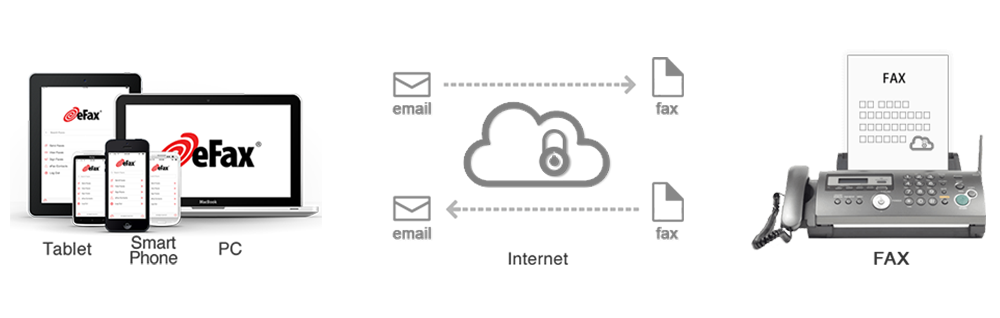
When sending a fax online, documents are first attached to an email and sent – fully encrypted – to the recipient. When a fax is received online, it arrives via email as a PDF. Automated email notifications of successfully sent and received faxes are triggered and sent immediately.

When cloud faxing is adopted by a legal office, lawyers can dedicate their billable hours to the important task at hand, without having to waste time dealing with the slow and outdated process of traditional fax machines. Time-saving initiatives like this are critical to the success of the legal team, and have a noticeable impact on overall office productivity. Tools like eFax Corporate allow you to send, receive and locate documents with ease.

Searching for a document amongst the hundreds, or even thousands of documents associated with a legal case is an unnecessarily time-consuming task. However, with a simple keyword search, members of the legal team can easily find the document they are looking for at a moment’s notice. 

The Bottom Line

Cloud faxing:
  • Is extremely easy to roll out and scale across your law firm.
  • Brings significant efficiencies and allows the legal team to quickly and easily send faxes.
  • Speeds up the data-transfer process, while ensuring maximum security.
  • Is cost-effective, and is based on a predictable pay-as-you-go model.
  • Significantly increases the protection of sensitive client information.

eFax Corporate Secure Business Faxing

Whether you’re responsible for IT in a small law firm with a couple of staff members, or an international firm that employs thousands, eFax Corporate allows you and your colleagues to safely and securely send and receive sensitive data to or from anyone, at any time.

Because eFax Corporate uses advanced TLS-encryption, all of your company’s data is fully protected during the sending process, while our 256-bit AES storage security technology keeps your documents and data secure in your password-protected email account. 

Why not let eFax Corporate take your law practice to the next level by improving your communication’s infrastructure? Contact eFax Corporate today and learn how we can improve your work-flow processes and employee efficiencies in a cost-effective way.

Why Faxes Are Legally Binding but Email Isn’t

Article overview:

The Importance of Legally Binding Fax

More and more organisations are seeking to upgrade their technology and ditch old-fashioned practices, such as the use of physical fax machines.

Fax machines, however, enable a number of important processes to continue, and that includes the transmission of legally binding documents that are admissible in a court of law.

This functionality cannot be lost.

Why Email Isn’t Legally Binding

Email seems like the obvious solution to your problems, but email documents are rarely admissible in court. For a document to be legally binding, it must be able to be authenticated to 100% accuracy. Email cannot offer this because it is vulnerable to:
  • Fraudulent activity
  • Interception
  • Manipulation
  • Hacking
Online faxing allows you to continue communicating with physical fax machines while taking advantage of all the benefits that come with it. You do not need:
  • New hardware or installation of equipment
  • To change contact details or fax numbers
  • To take downtime during the upgrade
  • To pay excessive costs for document sharing
Files sent over email are also bounced between servers, which does not provide reliable transmission timescales, dates or assurances that all information has been received.

How Online Cloud-Faxing Keeps Transmission Legal

eFax online cloud-faxing services enable organisations to continue sending legally binding documentation, even over a digital platform. But how can online faxing do this when email cannot? eFax services enable transmission of legal files thanks to:

  • Verified high-grade encryption
  • All fax documents being time-stamped and dated with absolute accuracy
  • Its ability to send original files that feature legally binding e-signatures signed through touchscreen technology
  • The software’s functionality, which allows physical, already-signed documents to be captured using cameras and transmitted through secure online channels.

Does your organisation or business need to send legally binding documents but doesn’t want to rely on physical fax machines anymore? Sign up to eFax today! Try our services without charge, totally risk free. No contracts, no commitments, but comprehensive access.

Learn More! Read the Full Story Below

When it comes to communicating within the legal and business industries, faxing is still the preferred business communication tool.

Despite being perceived as an outdated medium, fax has stood the test of time and is used by many industries as their primary means of data transferal. The reason for this is because of fax’s undeniable security and reliability, as well as its elevated status as one of the most legally binding communication tools available today.

In many different industries, but particularly in the legal sector, fax is the most-used medium of communication. In both business and legal circles, many documents still have to be printed and managed in hard copy. This is especially true for contracts, which require an authorised signature or company stamp in order for them to be deemed valid.

These types of documents often contain sensitive and confidential information, so a completely secure communication method is needed, one which can conveniently send important information quickly and securely.

Fax vs Email: The Problem With Email

So, why fax instead of email? One of the main problems with email is that it finds itself becoming increasingly vulnerable to interception, hacking and fraudulent activity. It is surprisingly easy for unauthorised personal to gain access to a company’s email accounts, which can have disastrous consequences, potentially resulting in legal action.

Using sophisticated software, criminals can hack into an email account by accessing login details and passwords. Using this information, they can read private correspondences, delete valuable data or even send fraudulent emails. The recent Sony Pictures email hacking scandal, served as a stark reminder that no organisation, regardless of their size or perceived security level, is fully exempt from a cyber attack.

Why Secure Fax Solutions Means Increased Security

In terms of security, fax is one of the most protected methods of communication available to a business. The superior level of security which it offers explains why it is the preferred medium for law and business professionals.

Legal, financial and other industries all need to ensure that all of their communication tools are 100% secure, as there is no room for error when it comes to sending confidential data, especially if it’s authenticity is ever called into question in court.

Can you fax legal documents?

Whether sent using a traditional fax machine or via the internet, messages are transmitted through a telephone line, meaning would-be criminals would have to know the exact moment a fax message was sent if they were to interfere with its transmission. This is why fax is, rightfully, considered to be one of the most legally concrete documents available to a barrister or solicitor. The sheer unlikelihood that a faxed document was tampered with during its transmission period means that its authenticity is hardly ever called into question.

Traditional faxing machines certainly make it difficult for messages to be hacked, but businesses can enjoy an even greater level of security when they choose cloud faxing – a much more secure and cost-effective technology.

One of the main advantages of cloud faxing is that service providers, like eFax, automatically encrypt all fax messages during and after transmission. At eFax, transmissions are encrypted with SSL (Secure Sockets Layer) and TLS (Transport Layer Security) protocols, which means documents are always 100% protected.

With online faxing services, a delivery receipt is always sent to the sender upon delivery confirmation. They are also always marked with a time and date stamp, which displays the exact hour it was sent. While this may seem like a somewhat minor detail, in the judiciary system this receipt is proof positive that a document was sent and received at a certain time. This type of the irrefutable evidence is invaluable to a legal team when putting their case together.

Is a faxed signature legally binding?

As mentioned previously, the authenticity of evidence is often called into question during legal proceedings. Thanks to advances in technology, attachments and messages sent via email can be doctored relatively easily. However, documents sent by fax are a lot harder to manipulated, meaning their credibility, especially when they contain a signature, is almost always guaranteed.

Under contract law, signatures are needed to confirm an agreement between two parties. In business, contracts are often agreed upon and signed by parties in two different locations. To get a legally binding “wet ink” signature, fax is often used to send documents from one party to another.

A faxed signature is legally recognised as valid and is often used to confirm or approve many business and financial deals. If a contractual agreement is broken, and there is a denial that any agreement took place, a fax of the original signed document is deemed to be sufficient evidence in court.

A common misconception is that only an “original” signature is submissible in court. However, when it comes to faxed documents, this is not the case. If your business currently relies on traditional technology, now is the perfect time to make the switch to cloud faxing – the modern way to fax.

A common misconception is that only an “original” signature is submissible in court. However, when it comes to faxed documents, this is not the case. If your business currently relies on traditional technology, now is the perfect time to make the switch to cloud faxing – the modern way to fax.

What is Cloud Faxing?

Cloud faxing enables your business to enjoy the reliability and security of fax, with the convenience of email. And when you sign up to a service provider, like eFax, your company can instantly enjoy an encrypted and speedy service.

With eFax, you’ll never have to use your legacy machine again. Instead, all of your fax messages are sent securely via email. Watch as your office’s productivity is increased, while your bottom line costs decrease.

You can now wave goodbye to paper jams and signal delays. Instead, watch as faxes are sent instantly from desktop – all the while enjoying the same level of security that we associate with traditional faxing.

If you’re interested in learning how internet faxing can help your business, why not call or email us today to learn about eFax’s competitively priced plans?

Faxing Through Email – A 21st Century Solution to an Age-Old Problem

When we think about sending emails, we envision a high tech and complex communications system which doesn’t leave a physical trace. This modern day means of sending messages, the natural progression of traditional letter sending, would beggar belief to those who worked in the business world only a single generation ago, such a game changer that it is.

With no need for paper, ink, toner or printers, receiving an email is a far cry from what business people had to go through when sending and receiving messages via email’s paper-based ancestors. By contrast, what typically comes to mind when thinking about sending faxes is quite the opposite of the streamlined and efficient process that is sending a simple email message. Here, we stereotypically think of a slow and laborious process, involving all sorts of time, labour and physical resources.

When faxing, office workers would traditionally have to check their fax machine for blockages, while ensuring that the signal is not too busy, before sending a simple document. If they neglected to do any of these monotonous tasks, catastrophe could strike in the form of a jammed machine, causing frustrating delays, reduced productivity and costing the company valuable money and resources in terms of man hours.

email-internet-fax-icons

Similarly, when receiving a fax message, office workers would need to ensure that their machine was switched on at the anticipated time of the message’s arrival, as well as making sure that the machine was fully stocked with enough ink, toner and paper to successfully print out the physical document. In the case of particularly large files, this could prove to be a tricky task, involving swift paper switches mid print out.

Surely there must be a better way to send faxes than relying on such outdated fax servers?

Are Faxes Still Useful in the Modern Work Environment?

While, at a glance, one might be tempted to think that the humble faxing service is a goner, outcompeted to the point of being obsolete by its sleeker, more modern cousin. It would be tempting to think that email is the natural replacement of the fax message. While it has certainly eaten into faxing’s share of the messaging market, there is still plenty of room for both. In fact, the two can, and must often be, used in tandem with each other.

While most people think that an email is actually ‘an internet fax’, this is not really the case. What many don’t realise is that there are several legal benefits associated with faxing which email does not enjoy. To that end, it is still essential that the modern business maintains a healthy fax-based communications infrastructure in order to comply with various legal requirements. That’s where faxing and email can work together…

How to Send a Fax Via Email

Nowadays, it is possible to send a fax message through the medium of email, combining the quick efficiency of the latter with the security and reliability of the former.

With eFax’s advanced fax by email service, sending your faxes quickly and securely over the internet couldn’t be a whole lot easier. All you have to do is attach the files (you can add up to 10 in one go) which you wish to send as a secure fax to an email message. Then, in the “To:” section, simply input your intended recipient’s registered fax number (or select them from your pre-existing list of contacts in your eFax account) and hit the send button – it really is that simple!

In a matter of moments (the same length of time which it takes to receive an email message), your recipient will receive the fax documents in their fax machine, just like they would have had you sent your fax the old-fashioned way. Even if their fax machine is switched off or experiencing a period of busy signal when you are sending your message, the eFax system is smart enough to understand this, and will continuously re-attempt communication until your message is properly delivered, meaning you’ll never again have to worry about your valuable documents getting ‘lost in transition’.

A business solution as simple as it is complex, faxing by email is a 21st Century solution to a very old office problem which eFax are more than happy to provide. Why not sign up for our no obligation Free Internet Faxing Trial to see what eFax can do for you?

5 Ways to Integrate Cloud Faxing Into Your Business Communications Workflow | eFax Corporate

From reading our most recent blog post, “How Cloud Faxing Works”, you should have a fairly good understanding of, not only, how cloud faxing can work for your company, but also of the technical rationale behind it. eFax Corporate offers businesses a wide range of flexible fax solutions and add-ons that will positively impact your company’s overall communication processes.

For now, let’s focus on the types of practical solutions eFax Corporate can offer your business and how you and your employees can seamlessly integrate cloud-based faxing into your day-to-day workflow, in addition to sending and receiving faxes through your office email accounts.

1. Secure Faxing

Internet and data security are paramount in today’s online landscape and should be a prerequisite when it comes to your company’s overall communication process.

As such, eFax Corporate provides numerous additional layers of security and protection. For example, with eFax Secure, instead of being sent directly to your email inbox, your received faxes will be held on a separate, secure and fully encrypted website that requires a password to access. In this scenario, only the intended recipient and designated system administrator would have access to this secure site.

eFax Corporate and eFax Secure also offer a feature known as Transport Layer Security (TLS) version 1.2 to encrypt faxes when they are “in-motion,” such as when they are being transmitted or received over an Internet connection. Encryption prevents faxes from being read by anyone other than the intended recipient who has the only ‘key’ that can unlock the document and make it intelligible once again. Due to the strength of its encryption cyphers, TLS 1.2 is the recommended security standard for compliance with government regulations protecting the privacy of data communications.

2. Cloud Faxing From Multifunction Printers (MFPs)

Multifunction printers (MFPs) are one of the most instantly recognisable tools in the offices of today. Offering printing, scanning and fax services all in one machine, they’ve become an indispensable tool for many offices across the UK and further afield.

Thankfully, moving your business communications network over to cloud faxing doesn’t mean you have to relegate your MFP to the scrapyard. Instead, many cloud-based services provide the option of fully integrating your multifunction printer with cloud-based faxing services.

A perfect example of how the two can be successfully integrated is if or when an employee needs to send a fax with a unique signature. This is a commonly required formality in certain service contracts. In such instances, the signature is needed for authorisation purposes.

When this occurs, documents can be placed on your MFP and then you can simply send the fax much in the same way that you would with a regular an email message from the machine. The service can be configured so that return faxes will go automatically to your email inbox and not to the MFP, unless of course you want them to.

Furthermore, because your company’s faxes are being sent via a cloud-based fax account, a detailed record of your fax history will be automatically maintained, meaning your fax usage can be easily audited for legal and compliance purposes.

Without a cloud-fax service, MFPs need to be hooked up to phone lines in order to send faxes, which can add significant costs to the communication system’s overall outlay. Line rental could cost your business anything up to £50 or more a month. It is also highly likely that your company will need to rent separate lines for each individual device, causing bills to pile up exponentially.

With a cloud-based fax service, the need for a dedicated fax line is removed due to the fact that your MFP will be Internet-enabled and capable of connecting to the cloud through your business’ local area network.

In the most practical of terms, this means that not only will your business save a considerable amount of money by disconnecting the analogue fax lines that were once needed for each machine, but your company can also repurpose and increase the value of the existing hard-wired office equipment. Learn more about MFP integration with cloud fax.

3. Integrate Your CRM with Cloud Faxing

In order to take your company’s staff’s productivity to the next level, you should consider integrating and embedding your Customer Relationship Management (CRM) applications, such as Salesforce for example, with your eFax Corporate account. This is an inventive way in which to streamline your company’s faxing communication as well as boosting overall staff productivity.

Although this type of integration might seem like a complex and time-consuming undertaking, it is actually fairly simple to organise and, with right cloud fax provider, like eFax Corporate, can be achieved quite easily. An Application Program Interface (API) will be provided to you, which can then be easily integrated with any CRM, ERP (Enterprise Resource Planning) system or a multitude of business applications. In addition to this, the APIs can work with any type of coding language, e.g. C++, Java, .NET, Python, etc.

For companies whose employees are required to create documents in CRM tools or have Electronic Health Records (EHR) which must be sent by fax (such as healthcare professionals), this process is a great way to save huge amounts of time and increase efficiencies.

With a cloud fax capability embedded into your Salesforce or other software, your company’s staff will be able to fax the necessary materials whilst using the application. This removes one step in the overall process as it eliminates the need to have to print or scan the document followed by faxing it.

Due to the fact that your faxing API is tied to your individual account, your company’s cloud fax account, along with all of its activity, is securely saved and readily available for use in your usage reports. This extra service allows your IT team to better track the company’s overall faxing activities, while keeping records in an efficient and accountable manner.

4. Integrate Internet Faxing with SAP Applications

Is your business working with an enterprise resource management (ERM) system, which is based on the software by SAP (System Applications Products)? If so, the following is one way in which to increase the overall value of your internet faxing services and improve the day-to-day workflow of your employees.

As a fully certified SAP partner, eFax Corporate can fully optimise your business communications by embedding faxes from directly within the SAP setting which your internal staff members use on a daily basis.

eFax Corporate’s innovative business solution, the SAP Fax Connector 2.0, will forward your faxes as SMTP (Simple Mail Transfer Protocol) messages (email) that securely and instantly travel across the Internet to eFax Corporate, where your messages are converted to fax image format for delivery to your intended fax recipients. Delivery Status Notification (DSN) emails are sent from eFax back to the fax message origin in SAP, where they are routed to the proper module and the user logs updated accordingly.

Much like integrating your faxing protocols with your multifunction printer (MFP), combining your SAP software with your cloud faxing provider means you can immediately improve the overall efficiency of your staff.

By removing numerous and often-times unnecessary steps in the faxing process, your employees can create and send any important documents they create within their SAP sessions.

5. Cloud Faxing From Mobile Devices

In terms of today’s modern business environment, remote working of employees has never been more prominent and has become a vital aspect of many an emerging business’ growth. Employees who have to work with international offices or clients are often required to work across multiple time zones and make themselves available to work on the go when the need arises, often at very short notice.

For businesses where employees are widely distributed across different geographies, who frequently conduct their business on the move or simply work remotely from home, another much more reliable and secure method of communication is required. More to the point, this method of communication must work seamlessly via a mobile application such as a tablet or smartphone.

We are now even more reliant on our mobiles than ever, and thanks to eFax Corporate’s agile mobile app, faxing on the go has never been more simple or efficient. eFax Corporate’s app distils the core functions of your cloud faxing service into an intuitive, convenient and secure interface. The application enables your company to send, receive, view and forward any faxes right away and from the convenience of your mobile smartphone or tablet device. You can even take a picture of a document, add a signature to it, and send it as a fax, right from your mobile device.

This means there’s no need to run around looking for a 3rd party or outside source which offers a faxing service. Faxing can happen anytime and virtually from anywhere, as long as there is internet available in the area.

This excellent versatility is just one of the many reasons why cloud faxing should be considered a priority for your business. It is perhaps no coincidence then that cloud faxing just so happens to be one of the preferred communication methods among the majority of the Fortune 500 corporations.

A pioneer within the faxing industry for more than 20 years, eFax Corporate offers a great range of useful tools, support and service. eFax Corporate will allow your company to send and receive its faxes using all of the aforementioned methods and technologies, ensuring that our service is extremely beneficial to your company’s business objectives.


If you have any questions regarding our cloud faxing services, please contact an eFax Corporate representative today.


Learn more about why you should choose eFax Corporate.

What Is Cloud Faxing? A Guide to Faxing without a Fax Machine

Article overview:

What Is Online Cloud Faxing?

Online cloud faxing covers a variety of terms, including:
  • Online faxing
  • Fax via email
  • Internet faxing
But what exactly is it? Online cloud-faxing solutions are an evolution of physical fax machines, often offering the same or improved functionality while bringing data transmission processes into the 21st century. eFax solutions operate through computer software and mobile apps.
cloud-fax

Online cloud faxing completely replaces the need for a physical fax machine. All documents and files are sent and received digitally, rather than over analog lines. Carry on sending fax to physical fax machines without having to own a fax machine yourself.

Why and How to Use Online Cloud-Faxing for Your Organisation

Why use online cloud faxing over physical fax machines? The benefits include:

  • Fax document security is increased through high-level encryption and access controls
  • There is no need for resource expenditure on toner, ink and maintenance
  • The process of sending and receiving fax is made much quicker and more efficient
  • Fax documents can be sent while working remotely
  • You can maintain important functionality associated with fax transmission, such as legal document sharing and instant submission/reception of visual files
  • Fax can be saved and easily accessed through online document management systems
  • Multiple fax numbers can be assigned to a single account, simplifying transmission.

Switching to eFax services is simple. Our solutions can quickly and easily be integrated into your current work environment.

How do you make the move to online cloud faxing?

  • Step 1 — Sign up to eFax using our free trial
  • Step 2 — Register your account and current fax numbers with us
  • Step 3 — Download our bespoke software to access eFax’s online portal
  • Step 4 — Ditch your physical fax machine and start sending digital faxes immediately

The process really is that simple!

Learn More! Read the Full Story Below

So, what is cloud fax? For many organisations, cloud fax services are a fairly vague concept. Terms such as “internet fax”, “fax via email,” “online faxing” and “the cloud” often appear online, but what many companies don’t realise and fully comprehend is the technical rationale behind online faxing.

You may have already read countless cloud fax reviews and are considering removing your old fax machine for a more reliable solution. Regardless, this guide will provide all the information you need to make an informed decision for your business.

In the broadest sense of the term, cloud faxing allows users to send and receive faxed documents through an email program or web portal, without the need for any on-premises hardware or software. Given that email is one of the most familiar tools used in worldwide offices today, moving business operations toward cloud-based faxing services allows a company to seamlessly integrate online internet faxing into an existing email communication thread.

Although it is certainly the most popular, email is but one of many options which are available to a business when it comes to updating traditional fax infrastructure and eventually moving away from hard-wired machines and clunky, costly fax servers to a cloud faxing model.

With online faxing, your company can enjoy a wide range of flexible options that will make faxing your primary communication tool. As well as the obvious communication benefits, cloud based faxing boasts a wide range of perks, such as increased productivity and reduced IT costs. By moving your fax service online, it will put an end to costly and time-consuming machine maintenance and instantly reduce paper usage and office supply bills.

In this piece, we will explain precisely how faxing through the cloud actually works, with specific attention paid to how it can be integrated within your company’s existing email communications, before elaborating on the various ways by which businesses can use cloud-based technology to unify and improve their existing communications systems.

Cloud Faxing Explained: Fax through Email Benefits

When signing up for service, eFax Corporate will assign your company a unique virtual fax number — or multiple numbers, depending on the size, location and specific requirements of your business model.

Small to medium businesses will normally require one or more eFax numbers that can be shared among multiple employees. Some companies will need multiple eFax numbers for use in each department or business location. Others will want all employees to have their own individual numbers in order to ensure that everyone in the company has autonomy and accountability.

With Fax Corporate, your company will be able to set up as many individual fax numbers as it needs, while still enjoying the flexibility of being able to scale operations up or down at any stage.

eFax Corporate offers a variety of different types of fax numbers, catering to various business needs. Among the options are standard local telephone numbers and toll-free numbers. In most cases, you can move your current fax numbers to eFax Corporate so there is no need change a previously published fax number.

Once your company has been assigned its specific eFax numbers, they can at once be used to send and receive faxes electronically, without the need for a traditional fax machine or fax server. (See related post on this topic: Is It Time To Retire Your Fax Server?).

Using a hypothetical example, we’re going to give you an overview of how eFax Corporate’s advanced cloud-based technology works. We’ll also explain how IT teams can quickly have employees faxing via the corporate email system.

Please note however, that this example only represents one of many potential scenarios. Other options include sending and receiving faxes from a web-based fax portal, from a secure encrypted portal, and via APIs for high volume applications.

How to Use Cloud Faxing Solutions To Fax Via The Internet

Once your digital fax numbers have been fully set up and assigned to user accounts, you will use the following email address to send faxes. This standard eFax Corporate format usually follows the below format, e.g. you would type in the recipient’s fax and follow it with “@efaxsend.eu”.

To send your first internet fax, all you need to do is simply open a new message in your office email program and in the “To” toolbar, enter the address, which would look like this: [email protected] .

Your next steps will vary, but at the very minimum you should want to craft a cover page. You can load your cover page simply by typing a message in the email body, or uploading a file or custom template that you had previously created for this purpose.

The next step involves attaching your chosen documents (most file formats should be acceptable) by uploading them from your hard drive, the cloud or USB stick and attaching them just like you would do so in a regular email message.

After sending the email and attachment(s), eFax Corporate will receive your message and any associated file attachments, immediately convert them to a standard fax image, and transmit them over the telecommunications network to your chosen recipient’s fax machine.

Once the message is successfully and completely received by the recipients fax machine, eFax Corporate will send you a confirmation receipt. This notice will then be saved automatically in your account and, in turn, will be available to access at any stage by logging into your company’s administrator portal. This system is ideal for offices or companies who need easy and efficient access to receipts and confirmations for auditing purposes as well as general record keeping.

When it comes to receiving inbound faxes, eFax Corporate will perform a very similar process but this time in reverse. A sender enters your eFax number into their fax machine, inserts the document and hits the “send” button.

The fax image will be delivered first to eFax Corporate and converted to either a PDF or TIFF (image) file (your preference), and immediately forwarded to the email address associated with the dialled eFax number.

Watch this short video to see how to receive a fax.

Cloud Faxing Explained: Fax through On-Line Portal

eFax Corporate’s cloud faxing package includes an on-line portal which allows users to access, send, receive, view and forward their fax documents. There is also means to easily view and retrieve all archived faxes.

What is particularly ingenious about eFax Corporate’s online faxing portal is that should the event arise where your company’s staff can’t access your corporate email account, they will still be able to send and receive business faxes through their cloud fax account. Using broadband access, users can access their eFax Corporate account from anywhere at any time, even when on the go, meaning business doesn’t have to slow down just because members of staff are away from their desks.

At this point, it is important to note that while you will be using email or web portal to send and receive faxes, to the outside world it will appear as though you are using a standard analogue fax machine. Your competitors and business associates will still think that your company is using traditional faxing methods, rather than using modern, efficient technology through the cloud.

If you have any questions regarding our cloud faxing services, please contact an eFax Corporate representative today.

Learn more about why you should choose eFax Corporate.

The Difference Between TLS and SSL Encryption | eFax Corporate

One of the many benefits of working with eFax Corporate is the level of security and data protection that we offer. For those involved with sensitive or highly confidential information, a secure communications network is vital, particularly for the legal, finance and medical industries.

But what many businesses don’t realise is that the level of protection a cloud faxing service offers can vary depending on the type of encryption that is employed.

Can Your Fax Encryption Create Security and Compliance Issues?

The two most common types of encryption technologies are SSL (Secure Sockets Layer) and TLS (Transport Layer Security). These are both cryptographic protocols designed to encrypt and authenticate data while it is in transit over the Internet, and are widely used in applications such as web browsers, email, online faxing services, Voice over IP (VoIP) and websites.

However, while the terms SSL and TLS are often used interchangeably, they are in fact quite different. These differences are profound, and can result in your digital communications being hacked or falling out of compliance with government regulations.

SSL is, quite simply, out of date. Would you trust your company’s proprietary or government-regulated data to a transmission protocol that was developed over 20 years ago? Probably not, and for good reason.

Even if you don’t know the specific details about data encryption and secure transmission, you intuitively know that hackers and cyber criminals have become much more sophisticated since the turn of the millennium — and so have the security technologies used to stop their attacks. It simply wouldn’t make sense to safeguard your most important digital assets with such outdated methods.

Another issue is that many fax servers do not encrypt their hard drive’s data effectively, which creates another security weak point for the company. This can be particularly troublesome if the server is connected to the organisation’s network and that network is hacked.

These professional internet criminals have the ability to hack into your company’s back-end system and steal valuable information, such as customer data and credit card details. This is of grave concern for businesses in the financial sector as well as large e-commerce retailers that store user data.

businessman-hand-selecting-cloud-security-concept

SSL (Secure Socket Layer) Explained

SSL works by encrypting the transmission path between a client and a server, and many companies still transmit their data using SSL — a protocol whose latest version, SSL 3.0, was released in 1996.

While it was the state of the art in its day, SSL 3.0 has since been shown to be vulnerable to the so-called “Man-in-the-Middle” attack, which would allow an interloper to insert themselves in the middle of a communication between two parties and quietly observe, or even alter, the contents of that communication without either party being aware. For example, a funds transfer from one bank account to another could be redirected to a different account at an off-shore bank simply by altering a few digits in the message.

This demonstrated obsolescence of SSL has led such major Internet players as Google and Mozilla to label the protocol as no longer

secure, and it has been officially deprecated by the Internet Engineering Task Force (IETF), the international body that creates the technical specifications on which the Internet operates. In the IETF document titled “RFC 7568: Deprecating Secure Sockets Layer Version 3.0”, it is stated in no uncertain terms that SSL must not be used, because any version of TLS is more secure than SSL.

Transport Layer Security (TLS) Explained

Transport Layer Security is basically the standards-track successor to SSL. Picking up where SSL 3.0 left off, TLS 1.0 was released by the IETF in 1999, and closed the security loopholes that were present in its predecessor.

Although significantly improved over SSL, TLS version 1.0 and even 1.1 have, over time, been shown to have vulnerabilities to certain types of attacks by ever more sophisticated hackers. That is why the latest version, TLS 1.2, is strongly recommended for compliance with NHS and other related data privacy guidelines, which require that personal health information, when transmitted across the Internet, be protected through encryption.

The purpose of the TLS protocol is to allow client/server applications to communicate in a way that is designed to prevent eavesdropping, tampering or message forgery, by creating a secure, authenticated communications channel (or ‘tunnel’) between sender and receiver that is protected by the strongest encryption available today.

By ‘encryption,’ we mean a cryptographic process that renders a communication unreadable and indecipherable by an outside party. Only the person for whom an encrypted message is intended will have the key that deciphers the coded message. And by ‘authenticated’ we mean a verification process which ensures that the parties to the conversation are who they claim to be and not impersonators.

This process of authentication, and setting up an encrypted communications channel, all happens transparently, as a result of a series of negotiations between the client (typically a web browser), and the server for a secure website, in a matter of seconds. The person attempting to connect to a secure website (as indicated by the HTTPS address prefix), will know they were successful when they see the lock symbol appear in the address bar of their web browser.

TLS can also be used for sending and receiving encrypted email, in which case the secure communications link will be established between a pair of email servers. This is also the process used to secure eFax transmissions across the Internet.

Again, the process is completely transparent to the people who are communicating over that link, with the exception that they may get an error message if their systems fail to establish a secure connection.

What TLS Encryption Means For Your Fax Security

First launched in 2016, the National Cyber Security Strategy is aimed at protecting Britain’s small businesses from all manner of cyber-attacks. The Government’s five-year-plan aims to raise awareness of the risk that legacy office equipment imposes. The strategy also aims to actively encourage British businesses to upgrade their digital security to fall in line with modern best practices. The National Cyber Security Centre’s website recently published a blog post on how to use TLS to protect data, which strongly recommends TLS encryption for businesses with an online presence. While improved data and internet security should be paramount for any online business, what exactly does this secure data encryption mean for your company’s faxing infrastructure?

Data Security and Cloud Faxing

If you’re considering a cloud faxing solution for your business, then it is vital to know what level of security is being offered and if it’s fully compliable with current regulations.

Before signing up with any provider, determine what level of fax security they offer and what protocols are being used. TLS and AES (Advanced Encryption Standard) are the two protocols which you should be most aware of.

  1. TLS 1.2 encryption is the maximum-security protocol used to transmit electronic faxes, whether that’s by email or online.
  2. AES (Advanced Encryption Standard) 256-Bit, is the recommended form of ‘strong’ encryption of your fax data while at rest, such as when your faxes are being stored.

Luckily, both of these encryption protocols can be found in eFax Corporate’s cloud faxing service. With eFax Corporate your faxes are highly secure, while in transit or at rest, in the secure cloud storage system.

eFax Corporate is a leading provider of cloud faxing services and has become a trusted fax partner for numerous high-profile businesses in the most heavily regulated sectors.

To learn more about eFax Corporate, and what it can do for your company, be sure to contact us today.

Paperless Faxing for Healthcare and NHS | eFax Corporate

Healthcare professionals will be all too familiar with the data security procedures involved in patient confidentiality, but your office’s technical equipment may unintentionally putting your organisation at risk.

Are You Meeting NHS Fax Policy and Healthcare Regulations?

Article overview:

The Risks of Physical Fax Machines for the NHS

Physical fax machines provide a backbone for NHS communication and document transmission. However, they also have a number of associated risk factors that present problems for patient data.

Submission of fax documents through physical fax machines creates opportunities for:
  • Unauthorised access
  • Theft or loss of sensitive information
  • The potential for transference to unintended parties through misdialing.
These risk factors put you at odds with data protection acts, HIPAA and GDPR. Failure to meet the requirements established by these laws can result in major financial and legal consequences. In order to achieve better compliance, a change is required. But what can the NHS do?

How Online Cloud Faxing Provides a Paperless Solution

eFax online cloud-faxing solutions remove the need for physical fax machines, thus lowering risks factors, but still enable the continuation of complete fax transmission functionality.

By upgrading your faxing services to eFax, you will:

  • See improvements to document sharing security
  • Boost your compliance with GDPR, HIPAA and data protection acts
  • Achieve level 3 NHS Digital compliance for fax transmission.

Our solutions have other benefits as well, such as reduced costs of operation and increased productivity.

eFax is simple to integrate into your current IT systems and affordable, too. Prices start at just £11.00 per month. Join today and experience unlimited access to all our services free for. Discover how we can transform your fax processing. No contracts; no commitments; cancel anytime!

Learn More! Read the Full Story Below

Patient information and confidentiality is strictly protected under the NHS Act, the Health and Social Care Act, the Data Protection Act and the Human Rights Act. While once an office stalwart, traditional fax machines in healthcare can leave highly-confidential patient data at risk of being accessed, lost, or stolen by unintended parties.

Because of this, it is important to keep your office’s fax infrastructure NHS compliant and as secure as possible.

The Problem With Fax Machines in the NHS

One of the main security issues with traditional desktop fax machines is the physical sending and receiving of sensitive paper documents, which are often left sitting on or around community fax machines and can be viewed and accessed openly

These newly-created paper documents could fall into the hands of individuals not authorised to access them, leading to an easily preventable breach in privacy. Your organisation needs to be proactive and shouldn’t wait for a security breach to happen to make the switch to secure online paperless faxing.

Even fax servers present security issues. For example, when an enterprise fax server’s hard drive reaches capacity, standard procedure is for an administrator to “purge” the contents — which often means printing out the fax records for filing. These documents can also be misplaced or seen by unauthorised personnel.

Another issue is that many fax servers do not encrypt their hard drive’s data effectively, which creates another security weak point for the company. This can be particularly troublesome if the server is connected to the organisation’s network and that network is hacked.

Recognising the fact that your company’s faxing processes can potentially leave confidential material open to being accessed by unintended personnel is enough to warrant a complete communication overhaul.

Using eFax Corporate, our secure paperless faxing service, all faxes are protected with TLS encryption and are fully compliant with NHS Digital and other industry privacy standards.

health-care-doctor-working-with-computer (1)

The HIPAA Compliant Fax Solution for Healthcare

Dealing with international faxes is an everyday occurrence for many companies, but for members of the NHS who liaise with American hospitals or medical institutions, it is important that they understand and adhere to HIPAA (the Health Insurance Portability and Accountability Act).

This act places importance on the protection of sensitive patient information. For this reason, all correspondence between British and American medical centres must be HIPAA compliant. Failure to meet HIPAA guidelines can result in heavy fines or other penalties.

For companies that work on the periphery of the NHS, eFax Corporate offers an efficient and secure method of communication. For example, a doctor’s office may need to liaise and forward documents to NHS institutions or to pharmacies, whilst also requiring out-of-office access to these faxes.

Online faxing means that faxes can be access via email at any time from any device so staff members do not need to be at work to receive or send faxes.

eFax Corporate and NHS Fax Compliance

The Information Governance Toolkit is a Department of Health (DH) Policy delivery vehicle that the Health and Social Care Information Centre (HSCIC) is commissioned to develop and maintain. It draws together the legal rules and central guidance set out by DH policy and presents them in a single standard as a set of information governance requirements.

eFax Corporate has completed the IG Toolkit Assessment and achieved Level 3 – the highest level attainable, meaning our faxing services and our privacy and security policies meet the standards and requirements as outlined by the NHS Digital.

eFax Corporate Secure Encryption: Protecting Patient Confidentiality

Unparalleled security is one of the main reasons why eFax Corporate has become one of the most trusted brands in business cloud faxing over the last two decades, especially among healthcare professionals. We know how to migrate your company’s business faxing to a highly secure and compliant cloud fax service and, most importantly, keep you on the right side of NHS Digital and HIPAA regulators.

And in light of the recent Ransomware attacks on the NHS and other medical institutions, it’s never been as important to make sure that your patient data is completely secure.

Besides optimised security, online faxing offers several other benefits, such as:

  • Lower business faxing costs.
  • Increase staff productivity.
  • Boosted security, in terms of fax transmissions and stored documents.
  • Reduced machine maintenance and improved IT team efficiencies.
With the ever-rising threat of cyber-hacking, your organisation can’t afford to leave communication protocols open to threats. The sending or receiving of ePHI (Electronic Protected Health Information) might leave your practice vulnerable to hackers or NHS security violations. To learn more about how eFax Corporate can help with your business’s communication efforts, watch the above video or contact us to receive a free custom quote.

Optimise Your MFPs with eFax Cloud Faxing | eFax Corporate

Faxing is still necessary for millions of businesses, even in our modern, Internet era. Industries like healthcare, legal, real estate, financial services and manufacturing all rely on faxing, sometimes every day, to operate their businesses.

In addition, multi-function printers (MFPs) are still widely used across the country. In fact, IDC, a research organisation, stated that as recently as 2014, 17 million MFPs were sold annually.  This bodes well for many businesses, as MFPs are the perfect alternative to using a fax machine if you need to send a paper fax, but have already transitioned your business to cloud faxing.

A common question we receive at eFax Corporate is: “How can I send a paper fax if we use cloud faxing and have eliminated our fax machines?” The answer is simple: Use your MFP.

Optimise Workflows and Increase ROI from Existing MFPs

multifunction-printer

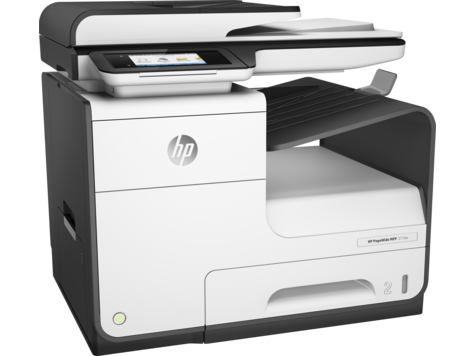
With eFax Corporate, you can always send a fax directly “from the glass” of your multifunction printer. The difference is that you would transmit the fax via the MFP’s email function rather than over a phone connection. Our service transforms your company’s MFPs into cloud-fax devices that can transmit your faxes via email.

In other words, you would be able to eliminate your analogue fax lines, but still maintain the ability to easily send and receive paper faxes through your eFax Corporate account.

eFax Corporate offers a MFP Fax Direct feature, which helps improve employee workflows, boost staff productivity, and relieve some of the IT headaches associated with the faxing process. You simply place a paper fax onto your printer and use the printer’s control panel to send it. eFax Corporate® converts the fax to an electronic file — PDF, TIFF or other format — and sends it to your recipient’s fax number, where it appears as a standard fax.

eFax Corporate® logs all relevant details of this transmission, emails you a delivery confirmation, and you then have the option to securely store the digital fax itself and the usage log in your eFax Corporate® cloud, so your organisation has access to it anytime for auditing or compliance purposes.

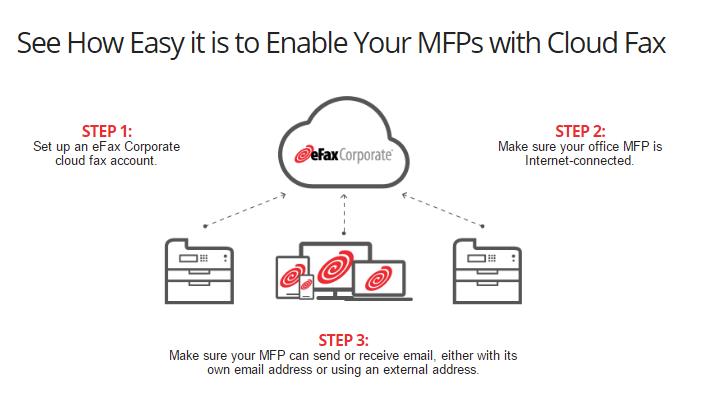
And in case you’re wondering just how simple it can be to eliminate your fax machines, fax servers, telco lines and all of the IT hassles that go with them, here’s what happens when you use eFax Corporate® with your MFP.


Essentially, you go from a complicated IT network of in-house managed fax machines and fax servers to a fully hosted cloud fax model where all management and upkeep of your fax infrastructure is outsourced to a team of professionals.

It’s easy to integrate your MFPs into your eFax Corporate® cloud faxing service and eliminate your legacy fax hardware.

This creates a single, integrated system for all of your fax and document transmissions, while eliminating significant IT overhead and pain points of maintenance, support, fax machines, fax server, telephone lines – things that can bog a business down.

The Integration or Migration to Cloud Faxing/Faxing with an MFP

A common question we receive from a lot of IT managers, CIOs, or business owners is: how much work is the integration or migration to cloud faxing and faxing from your MFP? So let’s take a look at how fast and easy it is to extend the capabilities of your MFPs to include cloud faxing. 

STEP 1: Set up eFax Corporate cloud fax account.

STEP 2: Make sure your office MFP is Internet-connected or ready.

STEP 3: Make sure your MFP can send or receive email, either with its own email address or using an external address.

That’s it! As soon as you set up your eFax Corporate® account, your staff can start sending paper faxes right from your MFPs.

It’s also important to point out that moving to a cloud fax model enables faxing from any end point, as long as it has internet connectivity and you’ve setup an account. Training is simple because if users know how to send an email, they can send a fax by eFax Corporate. But if they have that occasional need for wet ink signatures or dealing with a business requires a paper fax, it will always be an option to send from a MFP.

Scenarios for integrating cloud faxing capability with existing MFPs.

Now let’s take a look at some of the standard scenarios for integrating cloud fax capability with an organisation’s existing MFPs. This will help you determine the scenario most appropriate to your company’s needs and circumstances.

First Scenario: Small Office.

Our first scenario is a typical small office. Perhaps a legal practice or real estate office where a desktop or consumer type MFP is being used, often shared by the office. In most cases, the MFP has an email address assigned to it by the manufacturer, with emails routed through a cloud email service managed by the vendor. Usually messages sent to the MFP’s email address will be printed automatically.

To set up the integration, simply add the MFP’s email address as both a Send and Receive Address on one of the office eFax user accounts. Once added to an account, faxes sent to the user’s fax number will be emailed to the printer, where they will print automatically. When sending, use the “scan to email” function to generate an email message, then address the outgoing email as normal when using eFax: [email protected].

This is easy to set up, easy to use, and has almost no administrative overhead, as you’re using an existing account. However, keep in mind that because it’s tied to one account, you lose reporting on individual usage and have only a minimal audit trail. Using the vendor’s email server limits your security options and TLS encryption may not be supported.

Second Scenario: Large Office or Enterprise

The second scenario involves the use of a larger MFP, usually one of many located within a larger office or across an enterprise. These devices are often integrated more tightly into the organisation’s network. In most cases, these MFDs will have an email address assigned by the network administrator and will leverage the organisation’s email infrastructure. The device may also have access to network shares for storing files. Messages sent *to* the MFP’s email address can be printed automatically or written to a storage directory. The MFP is not configured to require individual user authentication – anyone in the office can walk up and scan, copy, or print.

To set up the integration, create an eFax user account for the device, using its email address for sending and receiving. Faxes sent to the MFP’s fax number will be emailed to the printer for automatic printing or storage to a SAN, for example. When sending, use the “scan to email” function on the MFD, then address the outgoing email as normal when using eFax:
[email protected].

This configuration is easy to set up and easy to maintain, and allows any employee in the office to send a fax without having an eFax account. You can assign a custom cover page to each printer account. And by using your email server, you can implement tighter security protocols like TLS encryption.

However, like the desktop solution, this configuration doesn’t provide delivery confirmation receipts to individual senders, nor does it offer granular reporting or usage tracking.

Third Scenario: MFP Tied to Active Directory or LDAP Server

In the third scenario, the MFP has an even tighter integration into the organisation’s network. In addition to an email address on the organisation’s email server, the MFP will also be tied to the Active Directory or LDAP server for user authentication. The MFP is then configured to require individual user authentication – users in the office must log in on the device before they can scan, copy, or print.

To set up the integration, create an eFax user account for every person in the office who’ll be using fax services. Faxes sent to the users’ fax numbers will be emailed to each user for viewing.

When sending, users log in to the MFP and use the “scan to email” function on the MFP, then address the outgoing email as normal when using eFax: [email protected] the previous scenarios, the emails appear to come from the user themselves, not from the printer, and are thus tied to each individual’s eFax account.

Since individual users are identified, this scenario allows for the greatest degree of reporting and tracking accuracy, and it provides a very clear audit trail. Each user receives their own delivery confirmation receipt and can have their own custom cover page.

The gains in reporting come at the expense of administrative overhead. For this configuration to work, every user in the organisation must have their own properly configured eFax account.

Fourth Scenario: Detailed Usage Tracking and Delivery Confirmations

Our final scenario is designed for organisations that want to allow any user to send a fax with detailed usage tracking and delivery confirmations, but without the requirement of an eFax account for each user. (e.g. AD or LDAP).

To set this up, create an eFax account for each MFP in the organisation, making sure to use the device’s email address. To send a fax, use the scan to email function, but instead of the standard address – [email protected] – your users will include additional parameters in the recipient address. These parameters allow users to specify their OWN email address for the delivery confirmation (they can enter their own email address), select a custom cover page, or supply a client matter or departmental billing code.

This is a great use case for employees who do a lot of faxing because many MFPs allow for programmable hot keys – or programming this SMTP info into memory as a memorised address.

So, after faxing, the delivery confirmation is emailed directly to the sender, while the email address and billing code are stored in the usage logs, allowing granular reporting, usage tracking, and an enhanced audit trail. With this feature, we’ve reduced the administrative overhead, while giving every user in the organisation a customisable outbound fax solution.
The Power of Cloud Faxing from Your MFP

Keep in mind that in addition to saving money on dedicated fax hardware, there are other unique benefits to integrating your multifunction printers with eFax Corporate:

  • Moving to a cloud fax model with eFax Corporate eliminates the dated fax infrastructure that can bog down your business and IT staff. You’ll also enjoy the benefits of your MFP fax integration which can streamline an inefficient business workflow process – sending paper faxes.
  •  You’ll also look like an IT hero because training is simple, since sending a fax with eFax is as easy as sending an email. Plus your staff can enjoy the convenience and simplicity of sending from any internet-connected device so they won’t be tethered to physical fax machines.

If you have any questions regarding our cloud faxing services, please visit our dedicated MFP Faxing web page and contact us for a demo so that we can show you how it works.
Learn more about why you should choose eFax Corporate.

How to Send a Fax By Email | eFax Corporate  

IT Managers and CIOs (Chief Information Officers) often come to us looking to find a solution to their faxing problems. Many organisations’ high volume of faxing can add an extra layer of expense to a company’s already growing office costs.

The obvious solution to such problems is to migrate your business’s fax infrastructure to a cloud-based faxing solution. And while most companies know this is entirely possible, either by sending or receiving faxes by email, a web-interface or mobile application, they ‘re often not aware of what the process looks like.

After all, most of these enterprises’ IT departments are still working with infrastructures which have not changed all that much since the 1980s. These tend to be made up of traditional fax machines and outdated in-house fax servers (Read our related post titled “Is it time for you to retire such fax servers?)

The Advantages of Internet Faxing

Saying goodbye to your old in-house equipment can prove to be a daunting task for some organisations, but upgrading to a cloud faxing solution can provide numerous benefits related to both company efficiency and faxing costs.

Traditional hardware-based faxing uses phone lines, which generally come with significant monthly costs. While in numerous cases, old-fashioned fax machines have been replaced with more advanced multi-function printers, the general processes associated with faxing through such systems remain largely unchanged.

As business faxing continues to rely on the somewhat outdated MFPs, a lot of companies are still sending faxes as they did well over a decade ago. Due to the persisting notion that old fashioned fax machines and analogue communication protocols are still the industry standard when it comes to faxing, a great many people working in IT aren’t quite sure exactly how faxing systems can work over the internet.

To this day, many do not know of the key benefits associated with internet faxing. Before making the big online switch, IT professionals usually get in contact with us to find answers to some frequently asked questions, such as:

Internet Faxing FAQs

  • “How can our employees / clients / customers send a fax to us through an email?”
  • “Are we able to use our pre-existing email software, or do we have to upgrade to a totally different platform?”
  • “Is it possible for us to create custom fax cover pages to help our company stand out?”
  • “Will we need to install any additional software when we upgrade to your cloud-based system? If so, will we have to make sure that this software is rolled out across every evice capable of sending and receiving faxes in our company?”
  • “Will we have to convert our files before sending them? And if so, what kinds of formats should we use?”
  • “A lot of the faxes that we send need to go overseas: Is that something that can be done with eFax Corporate?”

Online Faxing Tutorial

In order to quickly and efficiently answer all of the above questions, we created the following brief video tutorial (it’s less than a minute long).

It will quickly walk you through step-by-step process of making a brand new online fax message using little more than your business’ default email programme, which is unique to your company, and send your fax to anywhere in the world over a secure server, complete with an advanced TLS encryption.

Send Faxes to Anywhere in the World

Our complete video guide will walk you through each stage of moving your business faxing online and show you how easy it is to send your company’s first online fax.

The first step will show you how to send faxes both domestically and internationally. If you want to send a domestic internet fax, simply open a new message and in the “To” field, type your recipient’s fax number and add the suffix “@efaxsend.eu”, e.g [email protected].

eFax Corporate also allows businesses to send international faxes with equal ease. The only difference for international faxing is that you will need to add the country code before the area code in the recipient’s number.

Once you have selected whether you wish to send your message domestically or internationally, all that needs to be done is simply adding an optional custom cover page. The eFax Corporate video tutorial contains simple instructions on how to attach your files and create a cover page message to accompany them.

Your New Communication Solution

Our complete video guide will walk you through each stage of moving your business faxing online and show you how easy it is to send your company’s first online fax.

Upon watching our short tutorial video, you should have a much better idea of how eFax Corporate’s cloud faxing service works giving you a better insight as to how it can benefit your organisation in terms of greatly improved efficiency as internal processes become more streamlined.

Cloud-based faxing requires little in the way of ongoing maintenance on behalf of your IT team and is the ideal solution for IT professionals looking to improve their company’s communications infrastructure. At eFax Corporate, we are very confident that bringing your company’s faxing online will pay great dividends for your business.

Our cloud-based solutions make sending and receiving faxes every bit as easy as sending a simple email message. To find out more about what an eFax Corporate account can do for your business that a regular eFax account cannot, including access to our exclusive admin portal and the use of a dedicated account rep, feel free to contact us for a custom quote.

Is It Time to Retire Your Fax Server? | eFax Corporate

Is it time to remove your outdated fax server? Discover the modern cloud-based technologies that are more cost effective and secure

Article overview:

The Problem with Internal Fax Servers

Faxing as a communication method is a fundamental part of many industries. Advancements in technology, however, are calling old processes into question. While it has previously been common practice to maintain an in-house fax server, is it time your business looked for modern solutions? These are the drawbacks of using internal fax servers:
  • In-house servers are expensive to manage and maintain
  • They place a considerable drain on IT department time and resources
  • They don’t allow for rapid scalability
  • If using standard telecoms lines, you cannot transmit multiple files at once
  • Internal fax servers risk security and data protection compliance.
But if an internal server system is not optimised for business success, what methods of fax storage and management should you be using?

The Online Cloud Faxing Solution

eFax online cloud-faxing services can offer an effective alternative to in-house servers and physical fax machines. By moving your fax processes to an entirely digital and online space, you are free to:

  • Continue to send fax documents as you need through an online portal
  • Send large files quickly and easily – as well as multiple files at any one time
  • Remove costly hardware, such as fax machines and servers, from your workplace
  • Improve security and data protection compliance through external support systems
  • Scale your fax needs as required using adaptable cloud-based storage platforms
  • Free up time associated with physical faxing, including IT maintenance and paper document submission.

Our online faxing solutions are used by almost half of all Fortune 500 companies. The benefits of moving from old-fashioned internal servers can be felt immediately.

Sign up to eFax today and enjoy our free trial offer. Access our full range of eFax services and experience exactly how cloud faxing can transform your fax processes.

Learn More! Read the Full Story Below

For many years, IT departments around the world used in-house fax servers to help centralise their respective companies’ day-to-day faxing schedules in terms of both management and general monitoring, as well as data security. At the time, this type of system was considered to be high-end in terms of technology. However, as time moves on and technology becomes increasingly advanced, there are signs that this type of fax server architecture is becoming increasingly outdated and less efficient when compared to more modern systems.

Should Fax Servers Be Scrapped By Businesses?

It has been noted in recent times that there are numerous disadvantages related to the traditional fax server architecture which has formed a central part of many a business’ day-to-day operations.

The following are four compelling reasons which may make you reconsider your company’s approach to fax servers. and consider moving to an online fax solution

1. The Cost of Using Fax Servers

As with anything related to the running of a successful business enterprise, one of the first things you need to look at is how much something costs; and business fax server systems are no different in this regard.  

Unfortunately, your typical fax server system isn’t the most versatile or agile form of IT infrastructure, and can be challenging to scale should you need to upgrade or downsize your company’s capacity to send faxes. As your company grows you will inevitably need to send and receive more and more faxes

When such time comes around, your company will find itself having to make a big decision; persist with your existing fax server architecture or invest in upgrading to an entirely new one. Obviously, both options come with their own unique disadvantages.

The latter option, on the other hand, represents a substantial financial outlay. Purchasing an entirely new fax server system can cost thousands in terms of hardware. That’s not even taking the costs of associated software into account. Such additions can see the price of installation suddenly double. Then you have to take maintenance costs into account as well. Such large monetary outlays are not business decisions which can be made on a whim.

2. The Disadvantages of Using Telecom Lines

The financial costs associated with transmitting over digital ‘phone lines’ and analogue systems can easily be overlooked as they lack a physical, visible presence. The costs of such services vary. A single analogue line can be run fairly cheaply, with only a small monthly fee to pay. However, the main disadvantage associated with this option is that you can’t send multiple faxes at once, which is far from ideal in a busy working office environment which may require a great many faxes to be sent out at any given time. A significantly more efficient option is to opt for a multi-channel digital service, which would allow for the sending of multiple faxes at once. Unfortunately though, this system comes at a price, with costs which will easily run into the range of hundreds per month.
Analog and telecom costs are fast becoming a thing of the past as far as modern business IT is concerned. Such expenses can be removed from a company’s outlay fairly easily. All that needs to be done is to commit to converging all of your business’ fax traffic into your internet access network. From an IT perspective, this is a sensible move toward working efficiency.

3. Fax Server Maintenance Wastes Valuable IT Resources

Another often overlooked indirect outlay associated with running traditional fax servers from your office space is what it costs in terms of ‘man hours’. No doubt, your company’s IT team will have to maintain the associated fax machines, resolve ongoing operational issues as they arise and provide training to other members of staff so that they can use the fax system properly. This is valuable time which the IT team could be putting into other, more lucrative, business endeavours.

In addition to the above, the IT team will need to carefully monitor the output and usage of any internal fax servers, with a view to judging when said systems are approaching their maximum usage capacity, and in turn making recommendations as to when the system needs to be upgraded. This is not as clear cut a task as one might think initially, as sever workload and demand can change quite quickly, especially if your business experiences an unexpected (if not exactly unwelcome) spike in client leads, leading to a higher volume of important faxes needing to be sent and received on an ongoing basis.

While the costs associated with IT ‘man hours’ are considerably more difficult to pin down and quantify than the aforementioned ‘hard’ costs which have been covered earlier in this article, they should not be overlooked as they are still costing your company money, whether you can physically see where the money is going or not. Remember as well, that time spent here is time which could have been put to better use for more important IT concerns.

4. How Secure Are Fax Servers?

Another extremely important consideration to take into account when considering the viability of using a fax server system in your day-to-day business is that of security.  Many traditional fax servers do not properly encrypt their hard drive’s data in an effective manner, which creates an obvious ‘soft spot’ point for the company which can be exploited by opportunistic hackers. This can be of particular concern if the fax server is connected to your company’s main network.

Such vulnerabilities in terms of security become all the more problematic when we take into account that your company may be handling data which could potentially lead to a client or customer’s personal information falling into the wrong hands. Such information falls under the remit of very strict privacy and data protection laws. The loss of such data could have serious legal repercussions for your company, as well as the loss of reputation.

It should also be noted that it is still a standard form of procedure in many businesses for a company administrator to perform what is known as a ‘content purge’ of fax records. This typically involves said administrator physically printing out faxed documents for filing purposes. The dangers of these practices are fairly apparent; important physical documents could easily be misplaced temporarily or lost entirely, leading to a loss in record-keeping and internal accountability. Similarly, having physical documents on site leaves a company open to the possibility of non-authorised staff viewing documentation which they should not be privy to.

Can Cloud-Based Systems Replace Traditional Fax Servers?

When we take the aforementioned reasons into account, a clear case emerges that it is high time that modern businesses put an end to their use of traditional fax server systems. Ideally, they should be replaced with more secure, efficient and cost-effective solutions. While there are several different options available on the market, here at eFax UK we firmly believe that the ideal course of action to take is to replace your company’s existing fax server with a cloud-based faxing system

 
The key advantages of moving faxing operations over to a cloud-based system are many. For example, this fully online service allows your business to send, receive, view, edit and even sign your fax documents securely through email. Your business practices will benefit greatly from sending faxes by email as technical delays will 
become a thing of the past, allowing you to quickly and efficiently respond to clients and customers without having to worry about time-consuming printing and the dreaded paper jam. Cloud-based faxing services are also a lot more cost-effective than your standard wired fax server system. Instead of having to pay up front for the use of your server and specific telephone lines, you can simply ‘pay as you go’, meaning you won’t end up overspending during times when you aren’t sending or receiving as many faxes. Essentially, the cloud ensures that you are getting exactly what you are paying for, a much fairer system than the old method of paying for your potential faxing ability, only to have to pay yet again once the pre-conceived capacity is reached. To recap, here is what you are saving on when you move faxing services to a cloud-based system:
  • Fax Hardware Installations
  • Server Software Upgrades
  • Maintenance Costs
  • Telecommunication Line Rental
  • IT ‘Man Hours’
The many advantages associated with upgrading your fax server to a cloud-based system are clear. This is why eFax Corporate has become a trusted business solution for upward of 11 million customers worldwide, and is even used by almost half of the world’s Fortune 500 companies.
Read our whitepaper, The IT Manager’s Survival Guide to find out more about moving from fax servers to cloud faxing. Or if you’d like to learn more about eFax Corporate, read our brochure to find out about the features and benefits.